The ArXiV API allows programmatic access to the arXiv’s e-print content and metadata. “The goal of the interface is to facilitate new and creative use of the the vast body of material on the arXiv by providing a low barrier to entry for application developers.” https://
The API’s user manual (https://
Our examples below will introduce you to the basics of querying the ArXiV API.
Install Packages
import urllib
import arxiv
import requests
import json
import csv
import pandas as pd
from collections import Counter, defaultdict
import numpy as np # for array manipulation
import matplotlib.pyplot as plt # for data visualization
%matplotlib inline
import datetime
Query the API
Perform a simple query for “graphene.” We’ll limit results to the titles of the 10 most recent papers.
search = arxiv.Search(
  query = "graphene",
  max_results = 10,
  sort_by = arxiv.SortCriterion.SubmittedDate
)

for result in search.results():
  print(result.title)
A family of ideal Chern flat bands with arbitrary Chern number in chiral twisted graphene multilayers
Correlated insulators, density wave states, and their nonlinear optical response in magic-angle twisted bilayer graphene
Gate-versus defect-induced voltage drop and negative differential resistance in vertical graphene heterostructures
Enhancing the hybridization of plasmons in graphene with 2D superconductor collective modes
Anisotropy of the proton kinetic energy as a tool for capturing structural transition in nanoconfined H$_2$O
Metal-Insulator transition in strained Graphene: A quantum Monte carlo study
Non-perturbative field theoretical aspects of graphene and related systems
Hierarchy of Ideal Flatbands in Chiral Twisted Multilayer Graphene Models
Inducing a topological transition in graphene nanoribbons superlattices by external strain
Engineering the Electronic Structure of Two-Dimensional Materials with Near-Field Electrostatic Effects of Self-Assembled Organic Layers
Do another query for the topic “quantum dots,” but note that you could swap in a topic of your liking.
You can define a custom arXiv API client with specialized pagination behavior. This time we’ll process each paper as it’s fetched rather than exhausting the result-generator into a list; this is useful for running analysis while the client sleeps.
Because this arxiv.Search doesn’t bound the number of results with max_results, it will fetch every matching paper (roughly 10,000). This may take several minutes.
results_generator = arxiv.Client(
  page_size=1000,
  delay_seconds=3,
  num_retries=3
).results(arxiv.Search(
  query='"quantum dots"',
  id_list=[],
  sort_by=arxiv.SortCriterion.Relevance,
  sort_order=arxiv.SortOrder.Descending,
))

quantum_dots = []
for paper in results_generator:
  # You could do per-paper analysis here; for now, just collect them in a list.
  quantum_dots.append(paper)
Organize and analyze your results
Create a dataframe to better analyze your results. This example uses Python’s vars built-in function to convert search results into Python dictionaries of paper metadata.
qd_df = pd.DataFrame([vars(paper) for paper in quantum_dots])We’ll look at the first 10 results.
qd_df.head(10)Next, we’ll create list of all of the columns in the dataframe to see what else is there:
list(qd_df)['entry_id',
'updated',
'published',
'title',
'authors',
'summary',
'comment',
'journal_ref',
'doi',
'primary_category',
'categories',
'links',
'pdf_url',
'_raw']We have 14 columns overall. We’ll add two derived columns––the name of the first listed author and a reference to the original arxiv.Result object-–then narrow the dataframe to paper titles, published dates, and first authors to run some analysis of publishing patterns over time.
# Add a first_author column: the name of the first author among each paper's list of authors.
qd_df['first_author'] = [authors_list[0].name for authors_list in qd_df['authors']]
# Keep a reference to the original results in the dataframe: this is useful for downloading PDFs.
qd_df['_result'] = quantum_dots

# Narrow our dataframe to just the columns we want for our analysis.
qd_df = qd_df[['title', 'published', 'first_author', '_result']]
qd_dfVisualize your results
Get a sense of the how your topic has trended over time. When did research on your topic take off? Create a bar chart of the number of articles published in each year.
qd_df["published"].groupby(qd_df["published"].dt.year).count().plot(kind="bar")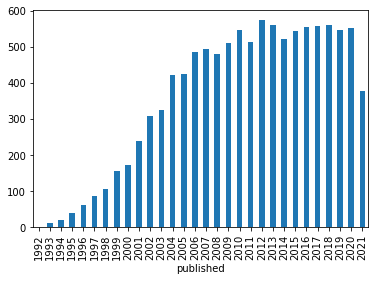
Explore authors to see who is publishing your topic. Group by author, then sort and select the top 20 authors.
qd_authors = qd_df.groupby(qd_df["first_author"])["first_author"].count().sort_values(ascending=False)
qd_authors.head(20)
first_author
Bing Dong 27
Y. Alhassid 20
Constantine Yannouleas 18
David M. -T. Kuo 16
Akira Oguri 15
Xuedong Hu 15
Kicheon Kang 14
B. Szafran 14
Rafael Sánchez 14
Massimo Rontani 14
Ulrich Hohenester 14
C. W. J. Beenakker 13
P. W. Brouwer 13
O. Entin-Wohlman 12
G. Giavaras 12
Vidar Gudmundsson 12
Piotr Trocha 12
Arka Majumdar 11
A. A. Aligia 11
Ramin M. Abolfath 11
Name: first_author, dtype: int64Identify and download papers
Let’s download the oldest paper about quantum dots co-authored by Piotr Trocha:
qd_Trocha_sorted  = qd_df[qd_df['first_author']=='Piotr Trocha'].sort_values('published')
qd_Trocha_sorted# Use the arxiv.Result object stored in the _result column to trigger a PDF download.
qd_Trocha_oldest = qd_Trocha_sorted.iloc[0]
qd_Trocha_oldest._result.download_pdf()Confirm that the PDF has downloaded!
Bibliography
Tim Head: https://
betatim .github .io /posts /analysing -the -arxiv/ Lukas Schwab: https://
github .com /lukasschwab /arxiv .py ArXiV API user manual: https://
arxiv .org /help /api /user -manual