Overview
An academic database is recommended for research because it is an organized collection of published scholarly materials which supports efficient, reproducible searching, often at a subject-specific level. At UC Berkeley, the Library provides access to over 1000 different databases.
Why use an academic database
Robust Search Features
Advanced searching: Filter results by resource type, topic, author, date, and more. Sort, save, and export results.
Sources
Peer-reviewed articles from thousands of journals, book chapters, conference proceedings, and more.
Supports Evaluation
All the information you need: Author names and affiliations, publication details, summaries, and abstracts.
Other search tools
What about UC Library Search, Google Scholar, or generative AI? There are many differences between these approaches, including what sources they pull from and how much control you have over the search process.
When to use the library catalog: UC Library Search
Use UC Library Search (UCLS) to find a variety of materials (books, media, archival collections, and many journal articles), or to look up a specific title. Here, you may search across UC Berkeley Library holdings, other UC campus libraries, the California Digital Library (CDL), and more. You may also filter by “resource type” or “peer-reviewed journals”. However, UC Library Search is not as in-depth as a subject-specific database search.
For more information, visit the UC Library Search User Guide
What to know about search engines & generative AI
A search engine, such as Google, Yahoo!, or DuckDuckGo, uses computer algorithms to search the Internet. Search results are not reproducible, likely varying between users, searches, and devices, and information found on the open web must be critically evaluated. With thorough evaluation of sources for relevance and reliability, a search engine may be useful to find government webpages and other openly accessible content which is not behind publisher paywalls. While Google Scholar limits its search of the Internet to scholarly resource types, such as journals, conference papers, theses and dissertations, academic books, pre-prints, abstracts, and technical reports, it lacks the accuracy and sorting features that databases provide, and is more likely to include unreliable sources.
A generative AI tool may seem like a quick way to find some information online. However, when you need original sources of relevant and reliable information, tracing and critically evaluating every source is actually time-consuming. If choosing to use one of these tools, always follow course and campus AI policies. It is important to understand how these tools work and how they are limited.
Issues to Consider:
Potential bias: AI tools may reflect biases or errors in their training process or source material (particularly if they are trained on or searching the open web).
Ineffective prompts: AI tools generally provide better answers when prompts are more specific and precise. At the beginning of a research project it can be difficult to formulate precise queries because you are just beginning to learn about a domain.
Generality: AI tools may provide better answers when the LLM has specifically been trained or draws on a relevant corpus (as in Retrieval-Augmented Generation, or RAG). ChatGPT, Gemini, and many other general generative AI tools are trained on text scraped from the open web, which is not domain-specific and includes misleading, biased, false, and harmful information.
Not reproducible: Search results will vary between users, searches, and devices.
For more information: Critical Generative AI Literacy
A-Z Databases list for finding and selecting databases
Introduction
A-Z Databases is a descriptive list of databases and other resources that will help you find the most relevant and reliable information sources for your research. It’s the best way to find databases because you can search categories and descriptions.
Access
A-Z Databases can be accessed from the UC Library Search Databases tab.

Finding Databases
Databases can be general (covering many subjects) or subject-specific.
General databases (examples):
Academic Search Complete
Scopus
Web of Science
Subject-specific databases (examples):
PubMed: medicine, molecular biology, public health
SciFinder: biochemistry, chemical engineering, chemistry
GeoRef: geology, geosciences
Searching A-Z Databases
database title (example: PubMed) or descriptive keyword (example: standards)
subjects (example: bioengineering)
types of sources (example: videos)
vendors (not needed for most searches)
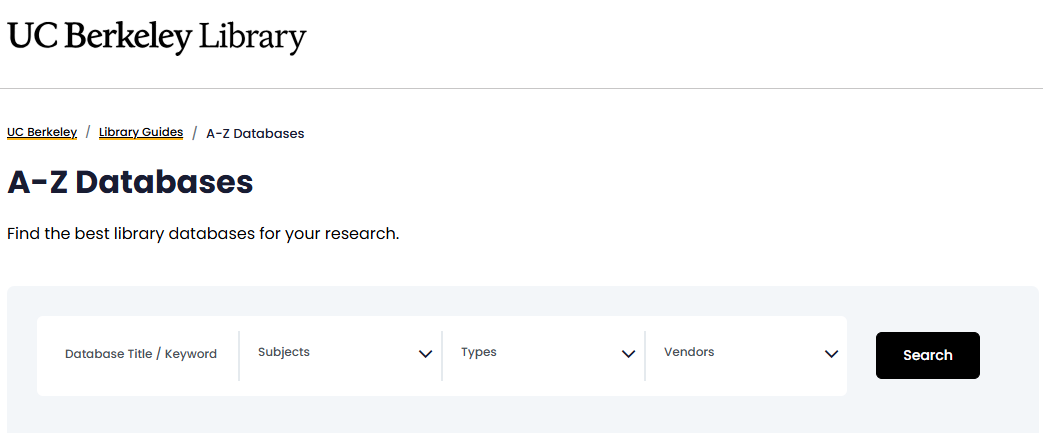
Title searching: Be sure you have the exact title, including spacing. “Geoscience World” returns no results; only “GeoScienceWorld” retrieves the link to the database of geological literature.
Keyword searching: Remember that you are trying to use words that match database descriptions, so be careful of using terms that are too specific to a particular topic. Searching on “breast cancer” retrieves no results, but searching on “health” retrieves over 200 information sources, including PubMed. If you’re looking for subjects (for example, biophysics) or resource types (for example, standards) that don’t appear in the drop-down menus, try a keyword search. Results are ordered by A-Z Databases’ relevance ranking, which may or may not match your own determination of relevance.
Subject searching: Under the “Subjects” drop-down menu, you can select one or more subjects relevant to your research topic. Librarian-recommended information sources will be in the “Recommended!” box at the top of the results list. Both the resources in the “Recommended!” box and the results list will be ordered alphabetically.
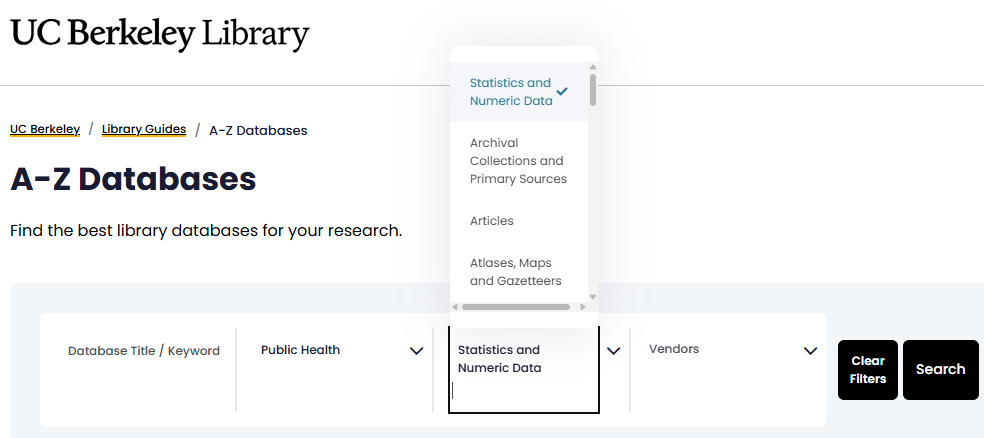
Combining categories: Different search categories can be combined (example: Subjects: Public Health and Types: Statistics and Numeric Data), and the results will be listed alphabetically.
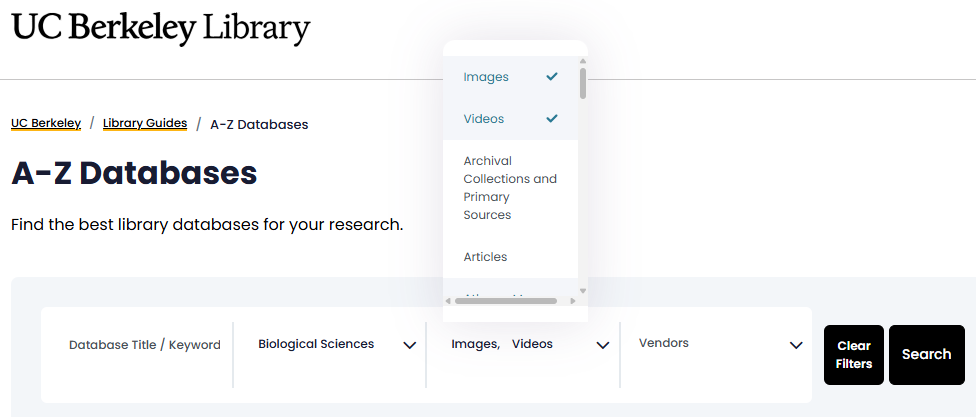
Multiple entries in each search category can be selected (example: Types:Images, Videos). Multiple choices are searched with an implied OR: resources in any of the selected categories will be retrieved.
Searches may not be comprehensive, depending on how the search terms match with the way the databases have been described and categorized (example: many of the resources in the “medicine” category would likely also be relevant to the “biomedicine” category).
Access: Get Full Text
Most library-subscribed databases contain citation information about journal articles and other sources, but only some databases contain full text. When full text is not included in a database, click “Get It at UC” to get online access to the article through UC Library Search.

If the library doesn’t subscribe to an article you need, use the “Request through interlibrary loan” link in UC Library Search to ask us to get a copy from another library.
See Interlibrary Loan for more information.
Databases for Citation Tracing
Once you’ve found an article that is relevant to your topic, you may be able to find additional relevant sources by looking at the research it is built on and has cited in its reference list (backward citation). It can also be very helpful to see more recent work that has cited the article you found (forward citation). There are several different databases you can use to do this, and the results will overlap -- no single database is comprehensive.
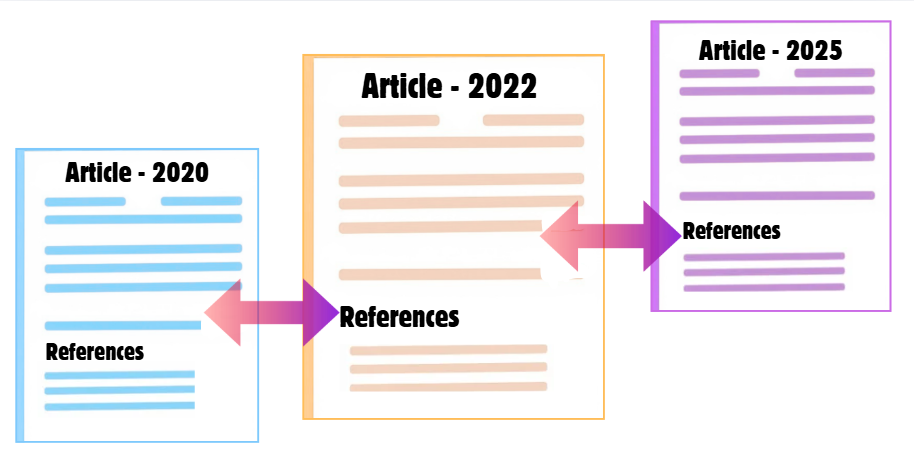
Google Scholar provides forward citations for most sources. It has a broader range of documents included (not just peer-reviewed journals, but reports, pre-prints, etc.) and doesn’t eliminate self citation or de-duplicate the results.
Web of Science is a vast, multidisciplinary database, which includes the Science and the Social Science Citation Indexes. This index allows you to do a “Cited Reference” search if you select that tab. This will retrieve other articles (from a prestigious list of peer-reviewed journals) which have cited the target article, and it also shows the references for the original article... both forward and backward citation.
Assessment
Assess your knowledge by expanding and responding to the questions below.
Knowledge Check 1: Selecting relevant resources
Scenario: You are seeking peer-reviewed articles on the health effects of wildfire smoke exposure. From the following A-Z Databases descriptions, choose the best database to search:
A. medRxiv: A preprint service for medical, clinical, and health sciences. Preprints “should not be relied on to guide clinical practice or health-related behavior and should not be reported in news media as established information.”
B. PubMed: Citations and abstracts from journals in the fields of biomedicine and health, as well as portions of the life sciences, behavioral sciences, chemical sciences, and bioengineering.
Check Answer
Correct answer: B
Why B is correct: Biomedicine and health are subject areas relevant to the topic of the health effects of wildfire smoke, and scientific journals in the fields of biomedicine and health indexed in PubMed are peer-reviewed.
Why A is incorrect: Although the subject area, medical and health sciences, is relevant, preprints are articles posted before undergoing peer review.
Knowledge Check 2: Finding resource types
Check A-Z databases to match the type of resource with the database where you’re most likely to find it.
Methods and protocols for working with citizen scientists on a wildfire recovery project.
Standards for fire hazard assessment of insulating materials in electrical power systems.
Journal articles on wildfire ecology.
A. BIOSIS Previews
B. Springer Nature Experiments
C. IEEE Xplore
Check Answer
Correct Answer: 1B, 2C, 3A
Explanation:
Methods and protocols The A-Z Databases description of Springer Nature Experiments (choice B) includes experimental procedures (including those involving contributions from citizen scientists).
Standards The A-Z Databases description of IEEE Xplore (choice C) indicates that it includes electrical engineering standards.
Journal articles: The A-Z Databases description of BIOSIS Previews (choice A) indicates that it includes journal articles on biological topics.
Knowledge Check 3: Tracing citations
Scenario: You have found a highly relevant article on wildfire risk assessment published in 2019. Match the numbered goal with the letter of the appropriate action.
Explore the previous work on which the 2019 study was built.
Find articles that may be related to the 2019 study that were published afterwards.
A. Perform a search for citing articles in a resource such as Google Scholar or Web of Science.
B. Look at the reference list of the 2019 study.
Check Answer
Correct Answer: 1B, 2A
Explanation:
The reference list of the 2019 study includes the sources which the authors drew from in designing and carrying out their study.
Performing a search for articles that have cited the 2019 study will retrieve articles published after 2019 that included the original study in their reference lists.